
Registration › Form Designer dresses the registration form. It sets the layout, a header image, which logo shows and the background behind it. Questions, prices, rules and access are untouched: they stay in the Form Builder.
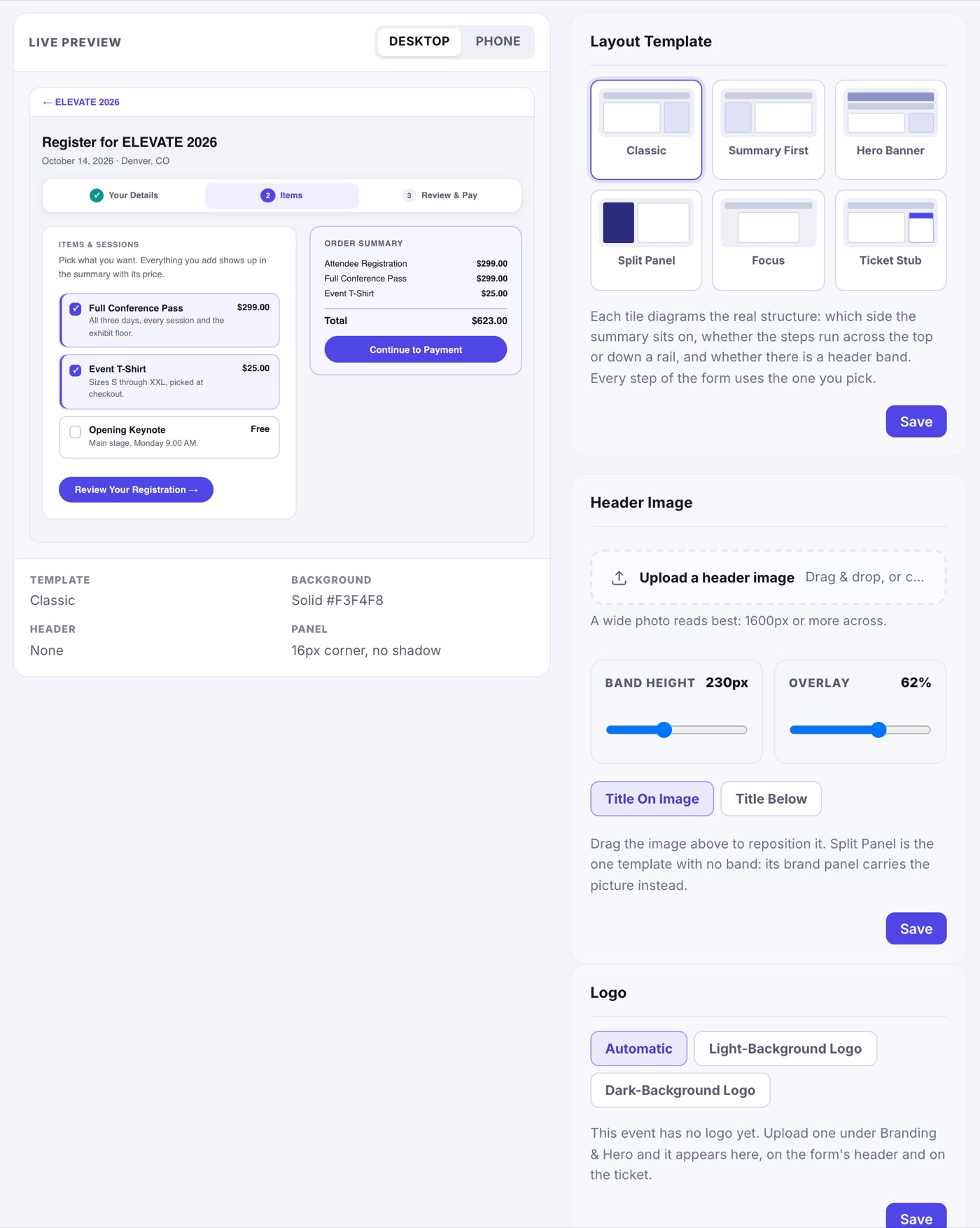
Layout Template
- Classic: the order summary on the right.
- Summary First: the summary on the left.
- Hero Banner: a header band, with the form lifted onto it.
- Split Panel: a brand panel with the steps running down it.
- Focus: the summary under the form, with a total bar.
- Ticket Stub: the summary drawn as a ticket.
On a phone every template becomes one column.
Header Image, Logo and Background
- Header Image: upload a wide photo (1600px or more across), drag it to reposition, and set Band Height and Overlay. Choose Title On Image or Title Below. Split Panel has no band; its brand panel carries the picture.
- Logo: Automatic, or force the light-background or dark-background logo you uploaded in Branding & Hero.
- Background: Solid, Gradient (a start and end color, in one of four directions) or Photo (with a Darken slider).
- Corners and Shadows set how the form's panels sit on that background.
The Live Preview at the left switches between Desktop and Phone. It is a styled sample, so use View Live Form on the Activation page to see your real form. Nothing is saved until you click Save; an Unsaved changes marker reminds you.