
A call for proposals turns Apply to Speak into a proper submission: an abstract, learning objectives, an outline, a format and length, and anything else you ask for. Speakers write and revise in their portal, you see every proposal in one list, and a review committee can score them before you decide. It sits in its own nav area, Call for Proposals, on a paid plan; a free trial can run a small call to try it.
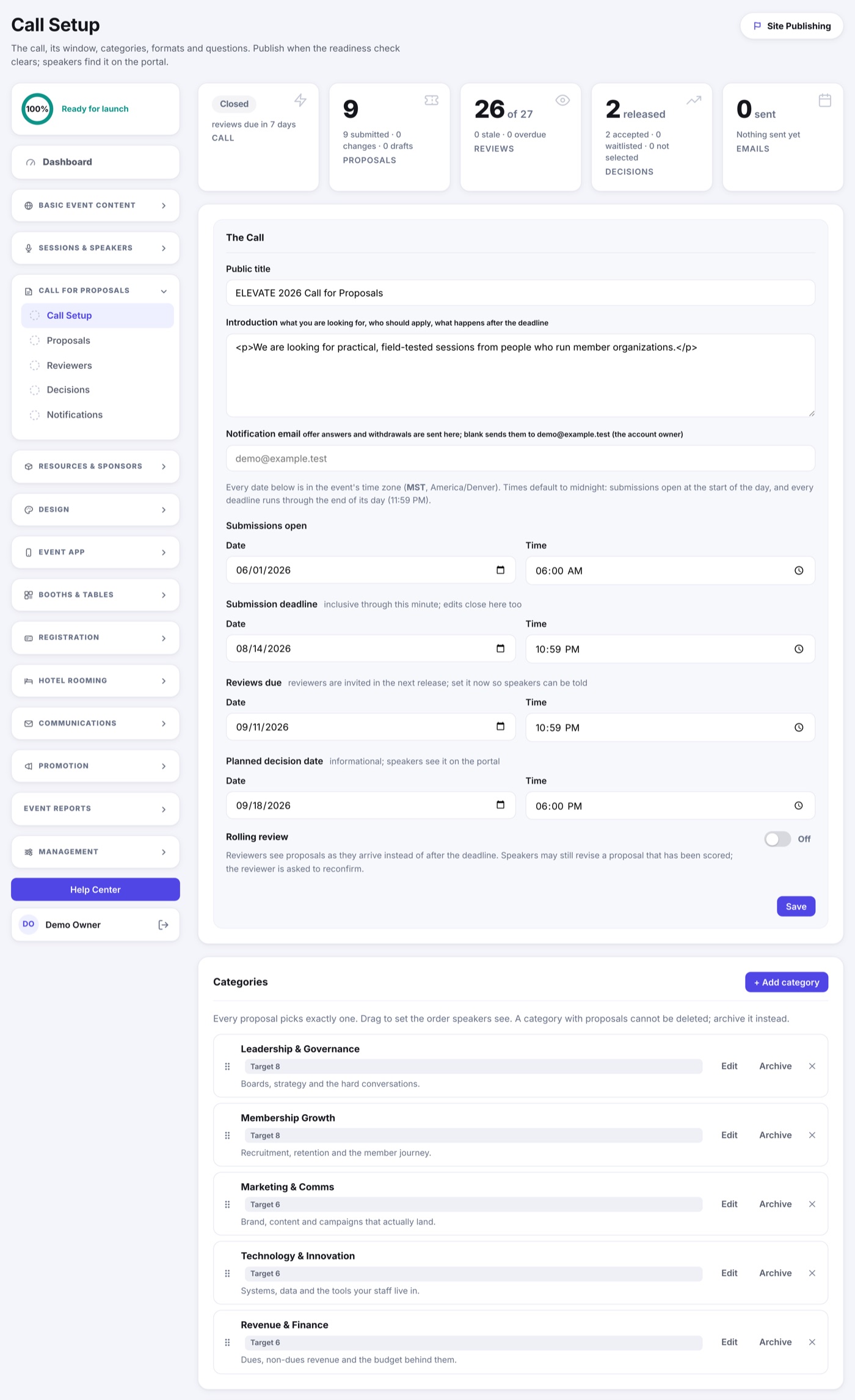
Set up the call
- Open Call for Proposals › Call Setup and click Set Up the Call.
- Give it a public title and an introduction. Speakers see both at the top of the form.
- Set when submissions open, the deadline, when reviews are due, and the planned decision date. Every time is stated in your event's time zone and enforced on the server, so a speaker's own clock cannot slip a late submission through.
- Add at least one category (a track or theme). Each can carry a short description, guidance for reviewers and a target number of sessions.
- Choose the formats and lengths a speaker may pick, and the audience tags if you use them.
- Decide which standard fields are required, add any custom questions from your Field Library, and mark who sees each answer: reviewers, only you, or both.
- Click Publish. The readiness check names anything still missing first.
Rolling calls accept proposals until the deadline and let reviews start as they come in. A fixed call opens reviewing only once the deadline passes. You can pause a call at any time with a reason speakers see, and reopen it later.
What a speaker sees
- Apply to Speak on the portal, or the link in an intake invitation, opens the proposal form. A speaker signs in with their email and a two-word code; no password.
- They can save a draft and come back, add up to four co-speakers by email (each keeps their own profile), and submit once the required fields are complete. A submission gets a receipt number and a confirmation email.
- Until the deadline a speaker can revise a submitted proposal. Each revision is kept, and reviewers who already scored it are asked to look again.
- After the deadline the proposal locks. You can grant one speaker an extension, or request changes to specific sections with a date to respond by, from the proposal's page.
The Proposals page
Call for Proposals › Proposals lists every submission with its receipt, status, category, revision and lead speaker. Open one to read the full proposal, see its people and their profiles, the reviews, every revision, and the activity record. From there you can lock it, extend its deadline, request changes, edit the content on the speaker's behalf (with a reason they are told about), or withdraw it. Every proposal also owns a session in your Agenda's bullpen, so the program copy is already in place when you accept it.